How Pod Identity Works in EKS?

You want your application or workload in Kubernetes (EKS) access AWS API or AWS resources like S3, DynamoDB, etc. You have two best ways of giving access — (a) via IRSA (b) via Pod Identity and AWS recommends Pod Identity. So, let’s unfold that one.
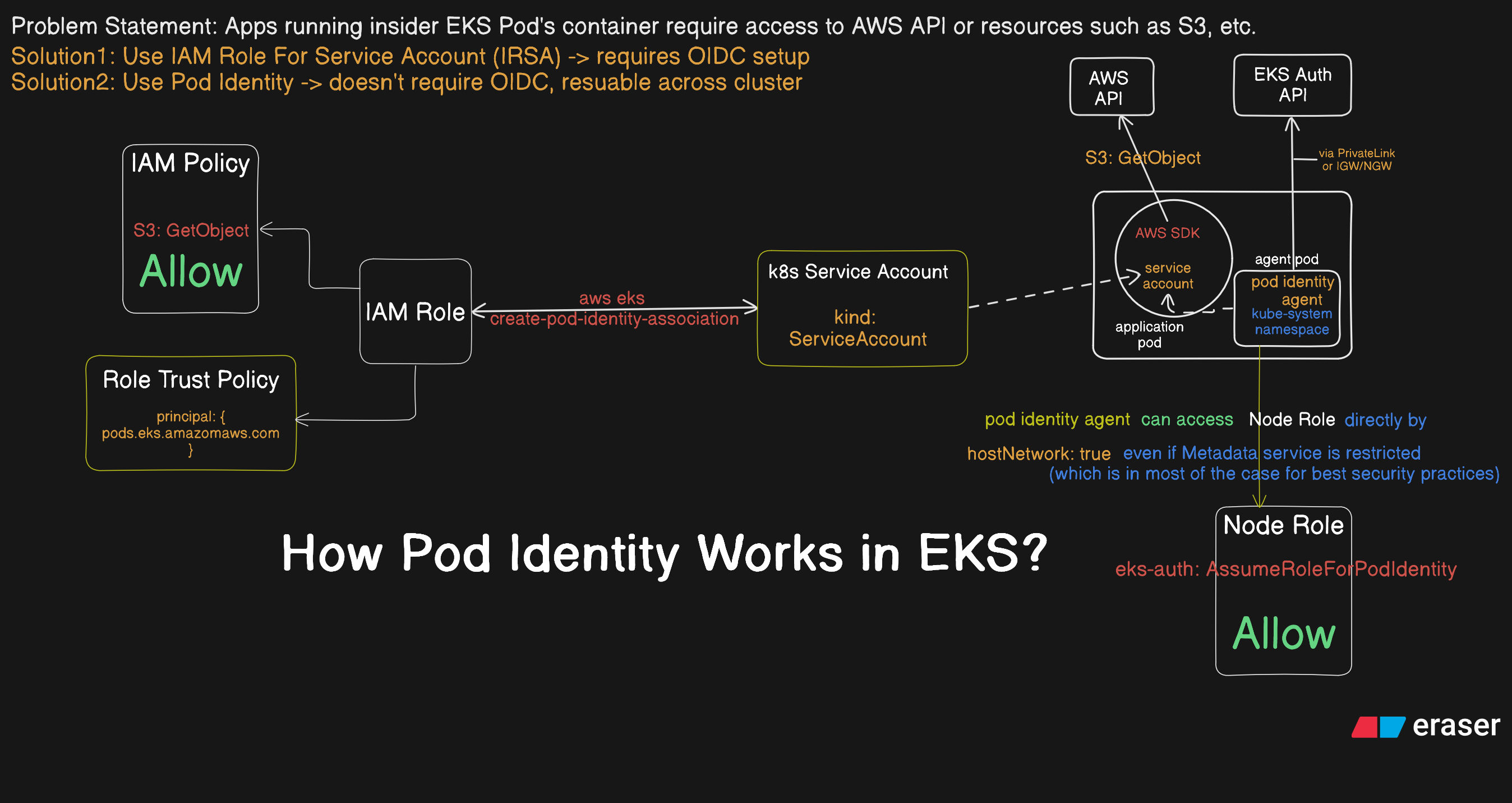
Problem Statement
The problem statement is very clear but let’s spell it aloud:
You want your application running in EKS Pod’s container access AWS resources or AWS API, How would you give your application that access?
As mentioned above, AWS provides two of the best ways to give access:
- IAM Role for Service Accounts (IRSA)
- Pod Identity
And AWS recommends to use Pod Identity when possible.
How Pod Identity Works?
By now, Pod Identity is nothing but a way to give application running in Pod’s container access to AWS resources but where to start and how to actually provide that access? Even before that, let’s roughly understand how that works:
- Pod Identity Agent is installed in every worker node in the cluster. If you are curious on how to add or what are the considerations, you can kindly visit AWS docs. Just for one liner command reference on how to add agent:
aws eks create-addon --cluster-name my-cluster --addon-name eks-pod-identity-agent --addon-version v1.0.0-eksbuild.1- When any Pod is started with Kubernetes Service Account associated with Pod Identity, the Pod Identity Agent calls EKS Auth API to get the temporary credentials and EKS makes sure that the container is attached those credentials. Actually after the Pod Identity Agent retrives credentials, EKS adds the following content to the Pod manifest so that the require credentials are available as environment variables:
    env:
    - name: AWS_CONTAINER_AUTHORIZATION_TOKEN_FILE
      value: "/var/run/secrets/pods.eks.amazonaws.com/serviceaccount/eks-pod-identity-token"
    - name: AWS_CONTAINER_CREDENTIALS_FULL_URI
      value: "http://169.254.170.23/v1/credentials"
    volumeMounts:
    - mountPath: "/var/run/secrets/pods.eks.amazonaws.com/serviceaccount/"
      name: eks-pod-identity-token
  volumes:
  - name: eks-pod-identity-token
    projected:
      defaultMode: 420
      sources:
      - serviceAccountToken:
          audience: pods.eks.amazonaws.com
          expirationSeconds: 86400 # 24 hours
          path: eks-pod-identity-token
Important
Pod Identity Agent is able to retrieve temporary credentials for containers because it is allowed to do so via Node Role. When IMDS is restricted on EKS nodes (via IMDSv2 hop limit of 1), regular pod containers lose access to the node IAM role — but the EKS Pod Identity Agent is unaffected because it runs as a DaemonSet with hostNetwork: true, meaning its traffic originates directly from the node’s network namespace (one hop from IMDS), allowing it to retrieve node IAM role credentials and use the eks-auth:AssumeRoleForPodIdentity permission (allowed via Node Role) to call the EKS Auth API, which then returns temporary, pod-scoped credentials served back to application containers via the link-local address 169.254.170.23 — so restricting IMDS actually strengthens security by ensuring pods can only access their own associated IAM role credentials, never the node role or another pod’s credentials.
- The SDK installed in your application container uses those environment variables to talk to the AWS API and get whatever resources they requires(of course this is allowed via IAM Permissions and Role).
Note
By default AWS SDK searches in a chain of locations for AWS IAM credentials to use. After valid credentials are found, the search is stopped.
Important
Even if credentials are made available to you as environment variables via Pod Identity. If your workload is using credentials that are up in the credential provider chain before these credentials, the workload would still be using those credentials. So, you can disable those if you strictly want to use this one.
What is The Process of Acquiring Pod Identity?
In Kubernetes, Service Account is the way to give Pod an identity so that Pod can talk to K8s API. The same service account can also be used for implementing identity-based security policies which is what EKS Pod Identity does. The K8s Service Account is bound with IAM Role which makes Pod Identity Agent possible to retrieve temporary credentials for that IAM Role and the application uses exact those credentials to perform actions allowed via IAM Policy (which is attached to that Role). IAM Role in AWS provides a way to talk to AWS API for non-human users assuming that Role and Pod is one of them.
Therefore, what can be said is that EKS Pod Identity combines both Kubernetes and AWS approaches to granting non-human identities access to resources, enabling Kubernetes workloads to securely access AWS services through IAM roles without requiring long-lived credentials. This means what you need are:
1. Kubernetes Serive Account for Pod
apiVersion: v1
kind: ServiceAccount
metadata:
  name: my-serviceaccount
  namespace: my-namespace
And obviously the Pod template uses the same service account:
apiVersion: apps/v1
kind: Deployment
metadata:
...
spec:
  replicas: 3
  ...
    spec:
      # Link the Service Account here
      serviceAccountName: my-serviceaccountt
      containers:
      ...
2. IAM Role Which Can Be Assumed (Only) By EKS Pod
{
    "Version":"2012-10-17",
    "Statement": [
        {
            "Sid": "AllowEksAuthToAssumeRoleForPodIdentity",
            "Effect": "Allow",
            "Principal": {
                "Service": "pods.eks.amazonaws.com"
            },
            "Action": [
                "sts:AssumeRole",
                "sts:TagSession"
            ]
        }
    ]
}{
"Version":"2012-10-17",
"Statement": [
{
"Effect": "Allow",
"Action": "s3:GetObject",
"Resource": "arn:aws:s3:::my-pod-secrets-bucket"
}
]
}Create IAM :
aws iam create-policy --policy-name my-eks-pod-policy --policy-document file://iam_policy.jsonCreate Role and attach the above policy:
# create role
aws iam create-role --role-name my-pod-identity-role --assume-role-policy-document file://trust_relationship.json \
--description "only EKS Pod allowed to assume the role"
# attach policy
aws iam attach-role-policy --role-name my-pod-identity-role --policy-arn=arn:aws:iam::111122223333:policy/my-eks-pod-policy
3. Associate Service Account with IAM Role for Pod Identity
aws eks create-pod-identity-association --cluster-name my-cluster\
--role-arn arn:aws:iam::111122223333:role/my-pod-identity-role\
--namespace my-namespace --service-account my-serviceaccount
Now when EKS launches Pod, Pod Identity make sure you have temporary credentials related environment variable set so that your SDK can use those temporary credentials provided by Pod Identity Agent.