How to Give Users Access to EKS Cluster Resources?

You can make use of AWS pre-defined set of K8s permissions or create your own set of K8s RBAC policy. Anyway it’s easy bro!
K8s Concept of Users
Kubernetes itself doesn’t have the concept of Users so you can’t ideally create a K8s object of kind: User the way you do for kind: ServiceAccount or any other objects. But what K8s or managed Kubernetes Services like EKS does is offload User management to underlying identity system and in AWS it’s IAM but User management or integration can also be offloaded to different providers such as LDAP, OKTA, etc. Just for a reference, K8s has clearly mention:
It is assumed that a cluster-independent service manages normal users in the following ways:
- an administrator distributing private keys
- a user store like Keystone or Google Accounts
- a file with a list of usernames and passwords
In this regard, Kubernetes does not have objects which represent normal user accounts. Normal users cannot be added to a cluster through an API call.
Access Mangement With Access Entries
AWS IAM Authenticator is already installed in the K8s cluster managed by AWS i.e. EKS cluster. aws-iam-authenticator runs as a DaemonSet which makes IAM users possible to authenticate it and access K8s objects and resources using Access Entries (and also with aws-auth ConfigMap which is legacy way and modern version should not use it).
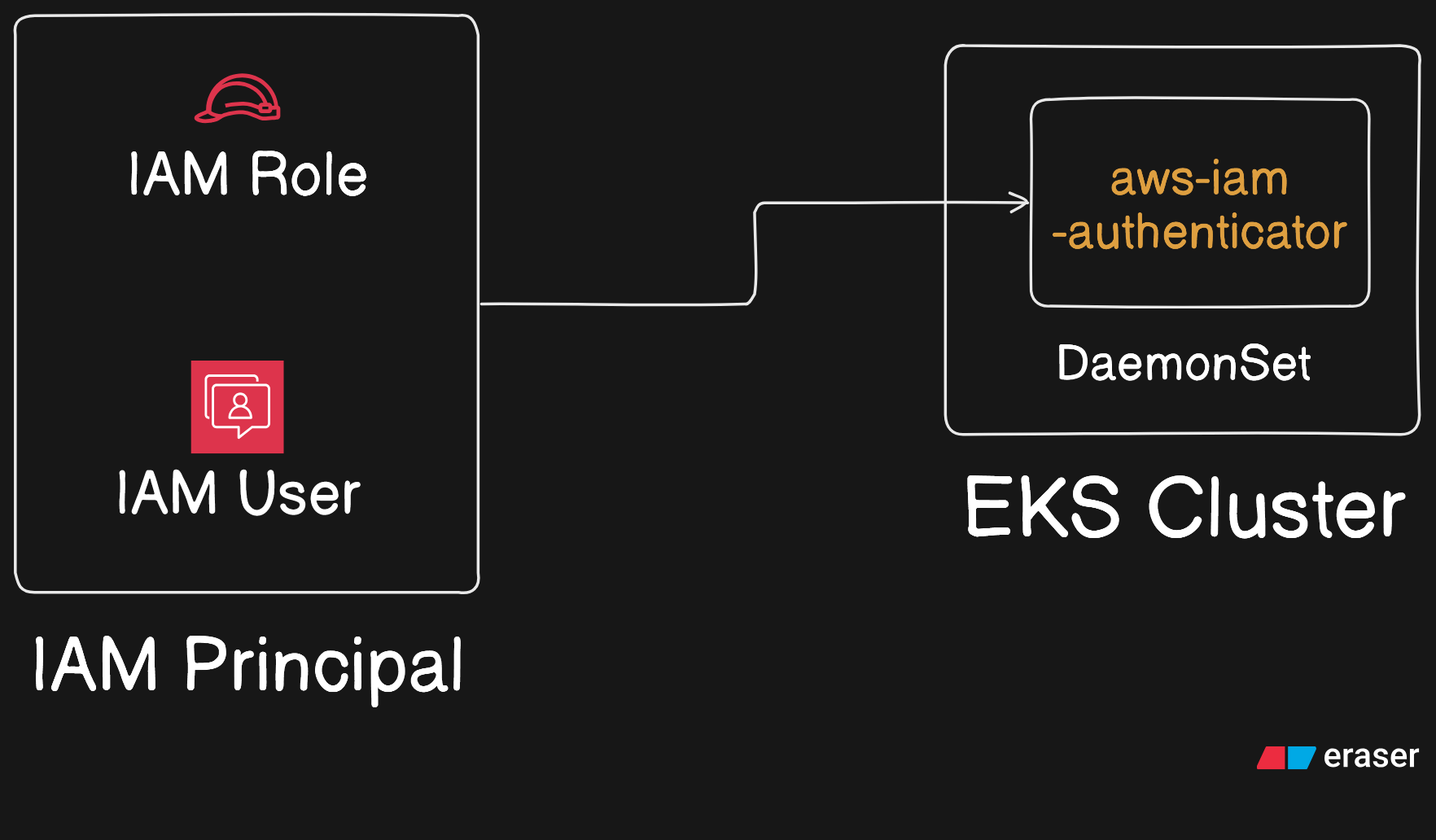
First of all, access entries are not IAM permissions. Basically, an EKS access entry asssociates a set of K8s permission with an IAM identity such as IAM User or IAM Role. It means a developer as a user can access K8s resources or a resource inside AWS can assume an IAM Role and get access to K8s resources.
Note
To use access entries, EKS authentication mode must be API_AND_CONFIG_MAP or just API.
aws eks update-cluster-config --name my-cluster --access-config authenticationMode=API_AND_CONFIG_MAPIf you are using Amazon EKS Auto Mode to manage data place, it requires Access entries.
In Amazon EKS, access entries are used to grant IAM principals (users or roles) access to a Kubernetes cluster. They can authenticate the IAM principal and, optionally, authorize it through an EKS access policy or Kubernetes RBAC.
EKS Access Entry Types
| Access entry type | Purpose | Typical use case |
|---|---|---|
STANDARD | General-purpose access for IAM users and roles. Can use EKS access policies, Kubernetes groups, or both. | Developers, administrators, CI/CD roles |
EC2_LINUX | Grants the permissions needed for Linux EC2 worker nodes to register with the cluster. | Self-managed Linux worker nodes |
EC2_WINDOWS | Grants the permissions needed for Windows EC2 worker nodes to register with the cluster. | Self-managed Windows worker nodes |
FARGATE_LINUX | Grants the permissions needed for Fargate pods to register with the cluster. | EKS workloads running on Fargate |
EC2 | Grants the permissions needed for EKS Hybrid Nodes to register with the cluster. | Hybrid nodes running outside AWS |
The current EKS API also includes these additional types:
| Access entry type | Purpose |
|---|---|
HYBRID_LINUX | Registers Linux nodes running on-premises or at edge locations as EKS Hybrid Nodes. |
HYPERPOD_LINUX | Supports Amazon SageMaker HyperPod Linux nodes that integrate with EKS. |
EC2 | Used for node roles in EKS Auto Mode. |
Rule of thumb: Use STANDARD for people and automation that need to access Kubernetes resources. Use the matching node-specific type for node IAM roles.
We will be dealing with STANDARD entry because by the time cluster is created (generally using eksctl), EKS has already associate other types of entries for the cluster to function properly.
Pre-defined Access Policy vs Custom Policy
AWS has bunch of pre-defined policy of K8s permissions which AWS calls as Access Policy which when associated with IAM Identity grants permission to K8s resources. For example AmazonEKSClusterAdminPolicy grants IAM principal administrative access to the cluster. Only in case those pre-defined permission doesn’t fit our requirement, we will create custom set of permissions by referencing K8s group i.e. creating kind: Role and kind: Rolebinding.
If you want to use AWS pre-defined policy, use associate-access-policy:
aws eks associate-access-policy --cluster-name my-cluster --principal-arn arn:aws:iam::111122223333:role/my-role \
    --access-scope type=namespace,namespaces=my-namespace1,my-namespace2 --policy-arn arn:aws:eks::aws:cluster-access-policy/AmazonEKSViewPolicy
If pre-defined access policy doesn’t fit your requirements, you can make use of K8s RBAC and create new access entry:
# pod-reader.yaml
cat > pod-reader.yaml << EOF
apiVersion: rbac.authorization.k8s.io/v1
kind: Role
metadata:
  name: pod-reader
  namespace: default
rules:
  - apiGroups: [""]
    resources: ["pods"]
    verbs: ["get", "list", "watch"]
---
apiVersion: rbac.authorization.k8s.io/v1
kind: RoleBinding
metadata:
  name: read-pods-binding
  namespace: default
subjects:
  - kind: Group
    name: frontend-developers
    apiGroup: rbac.authorization.k8s.io
roleRef:
  kind: Role
  name: pod-reader
  apiGroup: rbac.authorization.k8s.io
EOF
kubectl apply -f pod-reader.yaml
# create access entry (the group is defined in subjects in above yaml)
aws eks create-access-entry --cluster-name my-cluster --principal-arn arn:aws:iam::111122223333:role/my-role --type STANDARD --kubernetes-groups frontend-developers
Any user who can assume AWS IAM Role my-role and has eks: DescribeCluster permission can update their kubeconfig file in order to interact with K8s API:
aws eks update-kubeconfig --region region-code --name my-cluster