Mutable vs Immutable Objects in Python

You may have heard about mutable and immutable objects in python multiple times but what does they really mean?
Mutable vs Immutable Objects
Once in a while we all are confused with mutable and immutable objects in python. And if you are reading this — you almost certainly are. Before knowing them, lets know in general which objects are mutable and which are immutable:
list,dict,setare mutable objectsint,float,str,tuple,boolare immutable objects
The literal meaning of mutable is “changable”. This means immutable is “unchangable”.
“UNCHANGABLE”? But we have changed the value of int multiple times. Let me show you what I mean:
Example1: Immutable int
A code that will assign different value to num and print them:
num = 100
print(num)
num = 200
print(num)
The output is:
100
200
If
intis unchangable then how does the value ofnumchange from 100 to 200?
When you first write num = 100, num is just a reference to the object 100 created inside the memory. Let me show you what I mean:
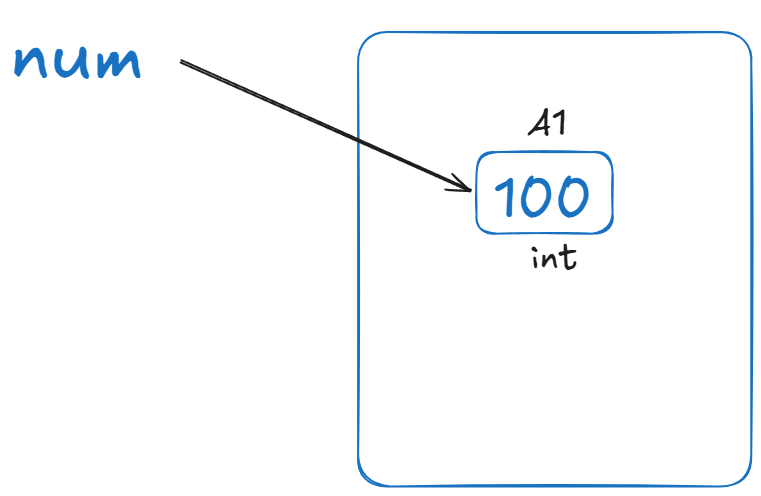
This means the actual object is 100 which python creates and knows the type is int. num is just a reference to 100 at memory location A1. You will be surprised what happens inside the memory on the next assignment of num = 200.
Since num is the same variable pointing to 200, 100 will be replaced by 200 at A1:
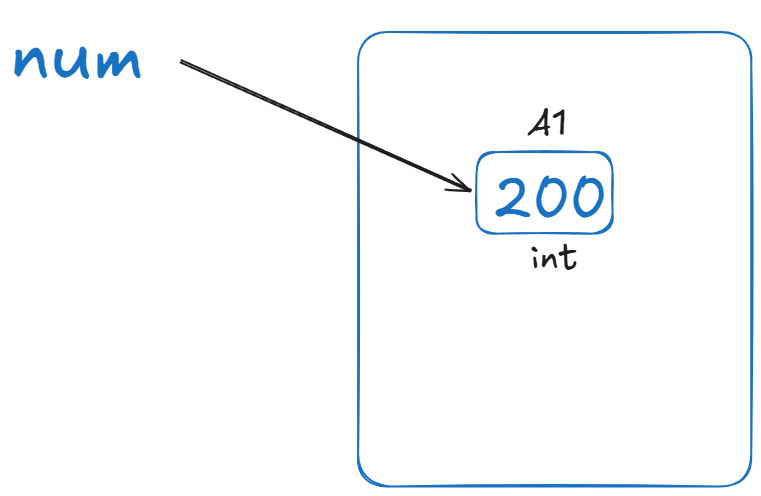
This is what you think, not what actually is.
Now I will tell you what actually is happening:
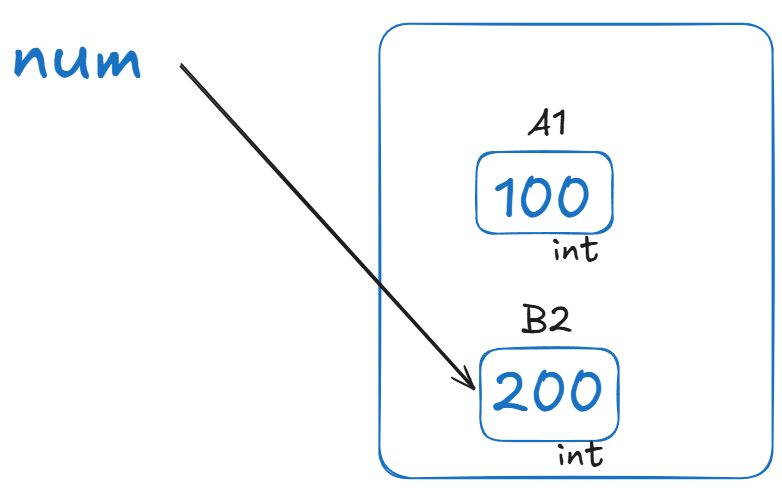
When you assign 200 to num, the entirely new object of type int with the value 200 is created inside the memory at different location B2, which then is pointed as a reference by num. This means Nothing is modified or changed or MUTATED inside the memory location A1 instead new object is created. This is the whole point of this mutable/immutable tale.
You can really verify with the help of id. If you print id of num along side it’s both value, you will see the difference. id is nothing but address or memory location. Try it yourself:
num = 100
print(num, id(num))
num = 200
print(num, id(num))
The expected output is:
100 136441748995880
200 136441748999080
Important
Mutable objects are updated at their current memory location. Immutable objects cannot be updated, so Python creates a completely new object at a different memory location and assigns the new value to it.
Example2: Immutable tuple
The more concrete example of immutable object will be tuple where we can actually show that tuple can’t be modified (mutated) in place. See the code:
t=(1, 2, 3)
print(t)
t[0] = 4
print(t)
You will get an error at line no. 3 which is obvious because tuple object does not support modification as it is immutable objects.
ERROR!
(1, 2, 3)
Traceback (most recent call last):
  File "/home/repl220/main.py", line 3, in <module>
    t[0] = 4
    ~^^^
TypeError: 'tuple' object does not support item assignment
list inside tuple is still mutable
Since list is mutable, you can still modify or perform list operatons even if list is inside tuple. Try this:
t=([1, 2, 3],)
print(t)
t[0].append(4)
print(t)
And you will see the second print has the appended value 4 printed.
([1, 2, 3],)
([1, 2, 3, 4],)
We have already seen that list is mutable but let’s go one step deeper.
Example3: Mutable list
The story of mutable objects can be more confusing than of immutable. So I will break it into two parts.
Part1: Modifying existing list
odd_nums = [1, 3, 5]
idBefore = id(odd_nums)
odd_nums.append(7)
idAfter = id(odd_nums)
print(idBefore == idAfter)
The output will be True because you are modifying the list at the same memory location i.e. no new object is created - you are just appending to the existing list because list can be mutated or modified. This is similar to the following inside the memory:
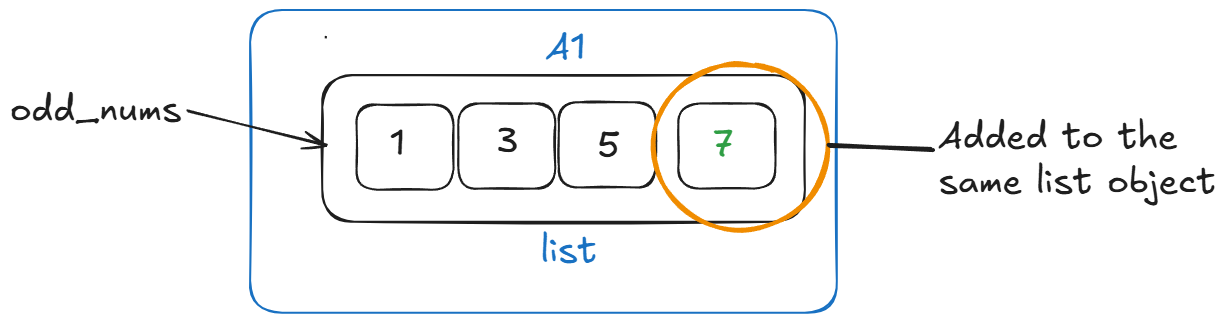
Conceptually, 7 is appended to the same memory location A1 sequentially. Internally, list adds reference not object itself but concept matters more than anything. If you have to summarize the internal implementation of list, it would be:
“A Python list is a sequential block of references. Appending an object adds a reference to that object into the list; it does not place the object itself inside the list’s memory block.”
Part2: Using Assignment Operator
Now the story has twist. See the code:
odd_nums = [1, 3, 5]
idBefore = id(odd_nums)
odd_nums = [1, 3, 5]
idAfter = id(odd_nums)
print(idBefore == idAfter)
The output here is False because even though odd_nums = [1, 3, 5] at line 1 and line 3 seems distinct and same operation, it isn’t. Each time an assignment operator (= only, not += or else) is used for list or any objects, python creates new object (unless python internally optimizes which is discussion for another day).
Python really can’t say, “I already have a list with these values, so I won’t create new list AGAIN!”. It simply allocates a fresh list object and odd_nums here is just a reference to the new list not the old one.
a = [1, 3, 5]
b = [1, 3, 5]

a.append(7)

# because `a` and `b` are two different objects, modifying one doesn't modify another

print(a)  # [1, 3, 5, 7]
print(b)  # [1, 3, 5]
Important
If python had returned same reference thinking that [1, 3, 5] is the same list as before, that would have been a real implementation problem becasue in that case, modifying one variable would unexpectedly modify the other.
There is one caveat
No pre-explanation, see the code:
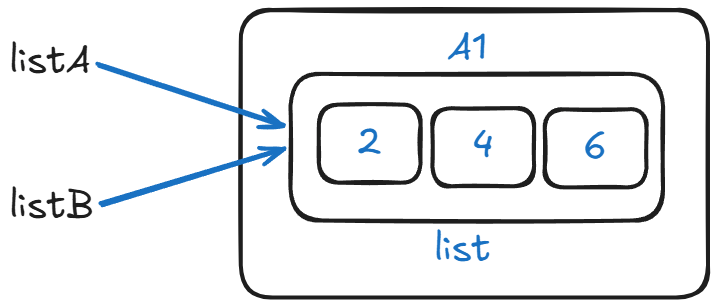
listA = [2, 4, 6]
listB = listA
print(id(listA) == id(listB))
Now, the output is True becasue the line listB = listA does:
- Take whatever object
listAis pointing to - Make
listBpoint to the same object
Think of it something like this inside the memory:
listA ──┐
        │
        ▼
    [2, 4, 6]
        ▲
        │
listB ──┘
Note
If you really want new object with the same items in the list you can copy listA to new list like: listB = listA.copy(). This will create new listB with the same items of listA and operations on each list is independent i.e now both list are different, not same.
To keep it simple:
If the RHS is a value (like a list literal
[2, 4, 6]here), Python creates a new object.
If the RHS is just a name (listBhere), Python reuses the existing object.
Read the assignment statement rules for more.
Diagrams and Visuals
Diagrammatically when syntax is reference assignment listA = listB:
Visually when syntax is literal assignment odd_nums = [1, 3, 5]:

Conclusion
To sum it up, take it as a general idea not as a hard truth.
If any objects can be modified in place (same memory location) than those objects are mutable else immutable.