Securing ArgoCD

Enabling TLS in ArgoCD using you own domain.
Every time I opened ArgoCD on localhost:8080, the browser yelled at me about the certificate. Annoying. Since I already own devstuffs.com, why not give ArgoCD a real certificate with a real name? Here is how I did it using Let’s Encrypt and certbot, all by hand, no automation needed.
Let’s Encrypt Using Certbot
Set up certbot inside a virtual environment:
python3 -m venv venv
source venv/bin/activate
pip install certbot
sudo ln -s $(which certbot) /usr/local/bin/certbot
The ln line is there so sudo can also find certbot, because sudo doesn’t know about your virtual environment.
Now ask for the certificate. I don’t have a public server to answer Let’s Encrypt, so I prove I own the domain using a DNS TXT record:
sudo certbot certonly --manual --preferred-challenges=dns -d argocd.devstuffs.comCertbot asks a few things and then stops and waits:
| Step | What To Do |
|---|---|
| Type one, or press Enter to skip | |
| Terms of Service | Type Y |
| TXT record | Certbot shows a name and a value, go add it in your DNS |
The record looks like this:
| Field | Value |
|---|---|
| Type | TXT |
| Name | _acme-challenge.argocd.devstuffs.com (or just _acme-challenge.argocd in some DNS panels) |
| Content | The random value certbot printed |
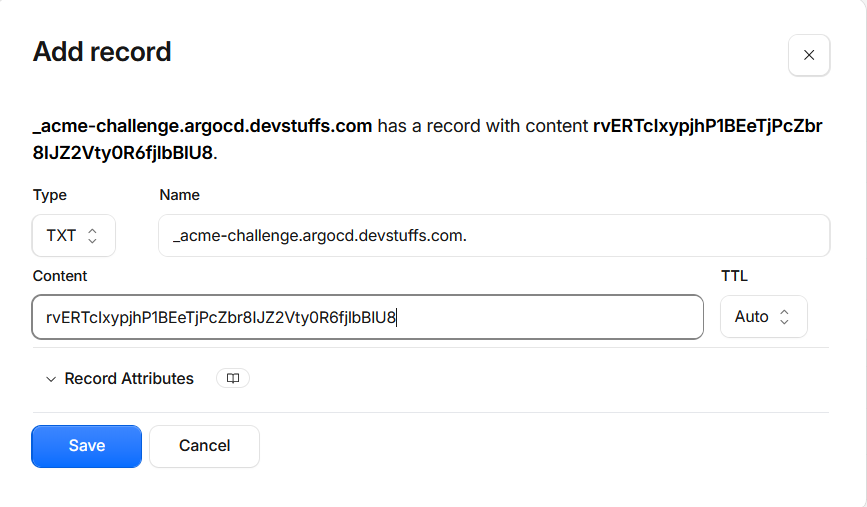
Warning
Do not press Enter yet. First check that the record is really visible, DNS can take a few seconds to a few minutes:
dig TXT _acme-challenge.argocd.devstuffs.com +shortWhen your value shows up, go back and press Enter.
If all goes well, you get:
Successfully received certificate.
Certificate is saved at: /etc/letsencrypt/live/argocd.devstuffs.com/fullchain.pem
Key is saved at: /etc/letsencrypt/live/argocd.devstuffs.com/privkey.pem| File | What It Is |
|---|---|
fullchain.pem | Your certificate plus the Let’s Encrypt chain. This is the one to use |
privkey.pem | Private key |
Note
These files are owned by root, so copy them to your folder first:
sudo cp /etc/letsencrypt/live/argocd.devstuffs.com/fullchain.pem .
sudo cp /etc/letsencrypt/live/argocd.devstuffs.com/privkey.pem .
sudo chown $USER: fullchain.pem privkey.pem
ArgoCD Settings
ArgoCD looks for a secret named argocd-server-tls in its own namespace. If it finds a valid cert and key pair inside, the argocd-server uses it instead of its self-signed one. So just create it:
kubectl create -n argocd secret tls argocd-server-tls \
  --cert=fullchain.pem \
  --key=privkey.pem
If you still see the old certificate after a minute, restart the server:
kubectl rollout restart deployment argocd-server -n argocdAccess
I am using kubectl port-forward, so my laptop must believe argocd.devstuffs.com lives at 127.0.0.1:
echo "127.0.0.1 argocd.devstuffs.com" | sudo tee -a /etc/hostsPort forward (keep it running):
kubectl port-forward service/argocd-server -n argocd 8443:443Check which certificate is being served:
openssl s_client -connect argocd.devstuffs.com:8443 -servername argocd.devstuffs.com </dev/null 2>/dev/null | openssl x509 -noout -subject -issuerYou should see argocd.devstuffs.com and Let’s Encrypt in the output. Now open https://argocd.devstuffs.com:8443 in the browser. No warning this time.
subject=CN = argocd.devstuffs.com
issuer=C = US, O = Let's Encrypt, CN = YE2
CLI works the same:
argocd login argocd.devstuffs.com:8443 --username adminNote
Use the hostname, not localhost. The certificate is made for argocd.devstuffs.com, so localhost:8443 will never match it.
Renewal
Let’s Encrypt certificates live for about 90 days. Because we did everything manually, certbot will not renew it by itself. Before it expires, run the same certbot command again, copy the new files, and update the secret:
kubectl create -n argocd secret tls argocd-server-tls \
  --cert=fullchain.pem \
  --key=privkey.pem \
  --dry-run=client -o yaml | kubectl apply -f -
Clean Up
kubectl delete secret argocd-server-tls -n argocd
kubectl rollout restart deployment argocd-server -n argocd
sudo sed -i '/argocd.devstuffs.com/d' /etc/hosts
sudo certbot delete --cert-name argocd.devstuffs.com
rm fullchain.pem privkey.pem
Also remove the _acme-challenge.argocd TXT record from your DNS, it is not needed anymore.