Introduction to Docker
Docker is a platform or application that uses the concept of containerization. Containerization is the concept which Docker any other Docker-alike platforms use. You can understand the technology when you understand the the history behind it, the same goes to Docker.
Once you understand the inception of why it was needed in the first place, the rest is just about working with Docker commands which you can find anywhere in the internet. Concept values more than commands. You can quickly reference commands but concept must be rooted into your memory.
Before Containers: History of Computing
Before starting containers, we have to understand why was it introducted in the first place. So, first, let’s dig into the history of computing.
The Problem With Physical Servers
Suppose, you started a company and bought a giant machine of 100GB memory and powerful CPU. The problem here is that now you have “just one machine”. What’s the probem though?
- You have one machine to login, to host your server, to do whatever you need to do — you still have just one machine.
Yes multiple persons can SHH and login to it remotely but Where’s the isolation? Without real isolation there is no point of multiple people using it (at the same time) because you are doing something useful in this machine — you are hosting your app for your valueable customers. You don’t want one intern poke your app or worse delete the app from the server.
Well, this is not the only reason. Another reason is that, your app even at high performance and load, use only 40GB of memory, not to forget while sitting idle (low load) it use even less. This means you are wasting at least 60GB of memory and CPU most of the times. Now imagine this at the scale of hundreds or thousands of machines.
This is where VMs come in place and try to solve the problem.
The Problem Virtual Machine Solves
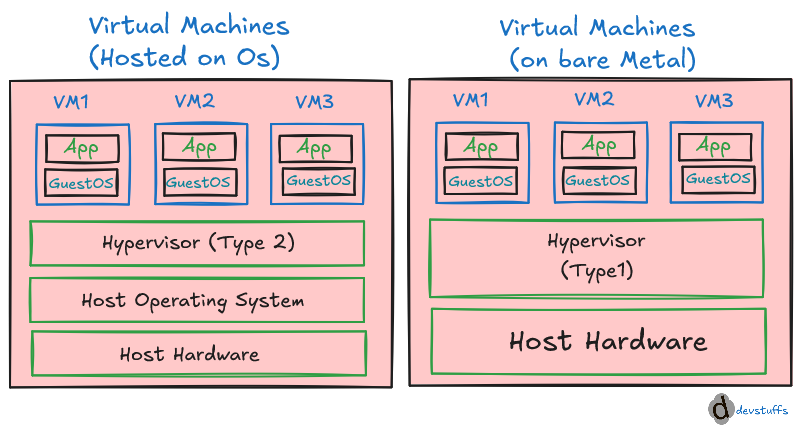
The picture shows two kind of VMs — one directly on top of Host Infrastructure using Type-1 Hypervisor, another on top of Host OS using Type-2 Hypervisor. Hypervisors are completely different topic and let’s not go there. The figure itself is clear which says:
By installing any type of Hypervisor, you get the benefit of using multiple OS which can be used for different purposes by different person and at the same time because Hypervisor ensures isolation. One OS can be Windows, another be Linux, another be Mac…
You see the rescue task done by VMs. It saves your computing cost sharing same hardware resources but still having isolation at OS level — Guest OS don’t fight eachother.
The Problem With Virtual Machine Itself
It’s great to have VMs but they still got the problem. Even though you isolated OS and use each OS for different task, you generally still pay cost more than you realized.
- Hypervisors themselves are not easy to setup
- Spinning up entire OS to host one application is costly memory wise and time wise because even minimal OS starts at GBs
- And that application even in high load may not use the entrie resources dedicated to the GuestOS
There are other problems related to application packaging and distribution but let’s not go there for now. You already have other problems to solve and when you solve that next with containers, you solve the packaging and distribution problem too.
This is Where Containers (Docker) Come In To Rescue
As we see, VMs are still heavy (often) for application — containers attempt to solve them. At this point, we already know that containers have to be lightweight no matter what to solve this problem. Other things come later.
Why are containers lightweight?
The figure shows the architecture of containers which also depicts the lightweight nature of containers. If you can’t see it, I will explain after the image.
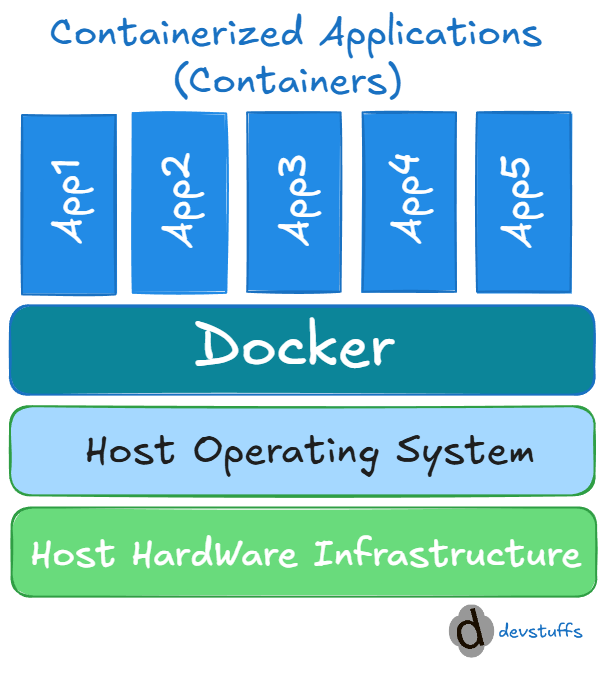
The key idea is that a container does not actually get a second kernel or a second bootloader. What it gets is a filesystem that looks like a complete OS, while the host kernel provides the actual operating-system machinery. So this is just a logical separation.
Containers package only what the application is required to run and not the whole OS — usually code and dependencies.
This means to achieve the same thing you are now dealing in MBs instead of GBs spent on VMs. Also when a container is not using it’s full resources, it allows other containers to use that resource. So, conceptually, you can spin up ‘N’ numbers of containers.
Think of containers as two layers:
HOST MACHINE
│
├── Linux kernel  ← REAL kernel, shared
│   ├── processes
│   ├── memory
│   ├── networking
│   ├── filesystems
│   └── system calls
│
├── Container A
│   └── /
│       ├── bin/
│       ├── etc/
│       ├── usr/
│       ├── var/
│       ├── home/
│       └── ...       ← filesystem only
│
└── Container B
    └── /
        ├── bin/
        ├── etc/
        ├── usr/
        ├── var/
        └── ...       ← another filesystem
What is Docker?
As previously answered — Docker is a platform or application that uses the concept of containerization. It makes packaging and distribution of software easy, lightweight and standard. To understand the general idea of Docker, let’s understand it’s architecture.
Docker Architecture Diagram
    flowchart LR

    %% =========================
    %% Client
    %% =========================
    subgraph CLIENT["Client"]
        BUILD["docker build"]
        PULL["docker pull"]
        RUN["docker run"]
    end

    %% =========================
    %% Docker Host
    %% =========================
    subgraph HOST["DOCKER_HOST"]

        DAEMON["Docker daemon"]

        subgraph CONTAINERS["Containers"]
            C1["Container"]
            C2["Container"]
            C3["Container"]
            C4["Container"]
        end

        subgraph IMAGES["Images"]
            IMG1["Ubuntu"]
            IMG2["Redis"]
        end

        DAEMON --> CONTAINERS
        DAEMON --> IMAGES

        IMG1 --> C1
        IMG1 --> C4
        IMG2 --> C2
        IMG2 --> C3
    end

    %% =========================
    %% Registry
    %% =========================
    subgraph REGISTRY["Registry"]
        R_UBUNTU["Ubuntu"]
        R_CENTOS["CentOS"]
        R_REDIS["Redis"]
        R_NGINX["Nginx"]
    end

    %% Client -> Docker daemon
    BUILD -.-> DAEMON
    PULL -.-> DAEMON
    RUN -.-> DAEMON

    %% Registry <-> Docker daemon
    DAEMON -. "pull image" .-> R_UBUNTU
    DAEMON -. "pull image" .-> R_REDIS

    R_UBUNTU -.-> IMG1
    R_REDIS -.-> IMG2


    %% Styling
    classDef client fill:#2563EB,stroke:#60A5FA,color:#FFFFFF,stroke-width:2px;
    classDef host fill:#1E293B,stroke:#64748B,color:#FFFFFF,stroke-width:2px;
    classDef daemon fill:#F59E0B,stroke:#FCD34D,color:#111827,stroke-width:2px;
    classDef container fill:#7C3AED,stroke:#A78BFA,color:#FFFFFF,stroke-width:2px;
    classDef image fill:#059669,stroke:#34D399,color:#FFFFFF,stroke-width:2px;
    classDef registry fill:#DB2777,stroke:#F472B6,color:#FFFFFF,stroke-width:2px;

    class BUILD,PULL,RUN client;
    class DAEMON daemon;
    class C1,C2,C3,C4 container;
    class IMG1,IMG2 image;
    class R_UBUNTU,R_CENTOS,R_REDIS,R_NGINX registry;
Generally, You issue a command or provides
Dockerfile(set of instructions given to Docker to perfom intended action) → Docker client sends it to the daemon → daemon performs the operation → images/containers are created or retrieved as needed.
Docker Workflow / Lifecycle
Typically, you start by writing a Dockerfile that describes the steps Docker needs to perform to create a Docker image. For example, you can specify that Nginx should be installed, application code should be copied, dependencies should be installed, and so on.
When you build the Dockerfile, Docker produces a Docker image containing everything you specified.
You can then use that image to create and run as many containers as you need. Each container is an isolated, running instance of the image.
Finally, you can push the image to a public or private container registry (docker image push). Anyone with access to that registry can then docker pull the image and use it to run containers on their own machine.
    flowchart LR
    %%A[/Dockerfile/] -->|"docker build"| B["Docker Image"]
    A@{ shape: doc, label: "Dockerfile"} -->|"docker build"| B["Docker Image"]
    B -->|"docker run"| C(["Container"])
    C -->|"docker push"| D[(Registry)]
    D -->|"docker pull"| E{{"Others' Machine"}}
    E -->|"docker run"| F(["Container"])


    %% Styling
    classDef source fill:#2563EB,stroke:#60A5FA,color:#FFFFFF,stroke-width:2px;
    classDef image fill:#059669,stroke:#34D399,color:#FFFFFF,stroke-width:2px;
    classDef container fill:#7C3AED,stroke:#A78BFA,color:#FFFFFF,stroke-width:2px;
    classDef registry fill:#DB2777,stroke:#F472B6,color:#FFFFFF,stroke-width:2px;
    classDef machine fill:#D97706,stroke:#FBBF24,color:#FFFFFF,stroke-width:2px;

    class A source;
    class B image;
    class C,F container;
    class D registry;
    class E machine;

    linkStyle default stroke:#64748B,stroke-width:2px;
Note
By this time, you may be overwhelmed by Docker terminologies but if you are going to adapt in Docker or Containerization ecosystem — you have to adapt terminologies too. So, here is the quick reference you can visit later after this lesson.
Limitations of Docker/Containers
Containerization isn’t always perfect. Everything has drawbacks or limitations:
Not a Full Virtual Machine — Containers share the host operating system’s kernel. This makes them lightweight, but provides less isolation than a traditional VM.
Persistent Data Requires Extra Planning — Containers are typically treated as disposable. Databases, uploaded files, and other important data need separate persistent storage.
Operational Complexity Grows — Running a handful of containers is simple, but large systems introduce challenges around networking, service discovery, scaling, monitoring, logging, and orchestration.
Security Still Requires Care — Container isolation reduces risk but doesn’t eliminate it. Vulnerable images, excessive privileges, leaked secrets, and misconfigured isolation can still create security problems.
There Is Still an Infrastructure Cost — Containers reduce overhead compared with VMs, but they don’t make applications “free.” The host still needs CPU, memory, storage, networking, and ongoing management.
Traditional Vs. Docker Flow
Traditionally, deploying an app means setting up a server, installing its runtime and dependencies, copying the code, configuring everything, and running it. Deploying another app may require different libraries or versions, creating conflicts and making each server harder to reproduce.
Docker packages the app together with its runtime and dependencies into an image. You can distribute that same image, pull it onto any machine with Docker, and run it as a container — giving you consistent, isolated environments without rebuilding everything from scratch.