Inputs and Secrets
Right now check-certs.yml computes the correct exit code and then does nothing with it. A 1 or 2 just ends the job — nobody finds out until they happen to check the Actions tab. That defeats the point of running this on a schedule; a monitoring job that nobody gets notified from isn’t really monitoring anything.
This chapter fixes that: when the check exits non-zero, the job sends an email. Since sending mail needs credentials, and credentials need to travel through the reusable workflow just like domains and warning-days did, you’ll also learn how workflow_call handles secrets — which turns out to be a genuinely different mechanism from inputs, not just an input with a padlock icon on it.
Setting Up a Gmail App Password
You can’t use your normal Gmail password for this — Google blocks plain-password SMTP login for security reasons. Instead, you generate a dedicated App Password scoped to nothing but sending mail:
- On the Google account you’ll send alerts from, turn on 2-Step Verification, if it isn’t already on (Google requires this before it will let you create an App Password).
- Go to your Google Account’s App passwords page and create one for Mail. Google shows you a 16-character password once — copy it immediately, you can’t view it again later.
- In your repo, go to Settings → Secrets and variables → Actions → New repository secret and add two secrets:
GMAIL_USERNAME— the full Gmail address, e.g.[email protected]GMAIL_APP_PASSWORD— the 16-character App Password from step 2, not your normal Gmail password
Note
A free Gmail account caps outgoing mail at roughly 500 messages a day. A nightly certificate check sending at most a handful of alert emails won’t come close to that, so it’s a non-issue here — just worth knowing if you ever point the same address at something higher-volume.
Why Secrets Aren’t Just Inputs
You might expect secrets: to be another key under inputs: in the workflow_call block. It isn’t — GitHub keeps them as two separate declarations, and the difference matters. Inputs show up in a run’s logs as plain values; secrets are masked wherever GitHub can detect them, and — critically — a reusable workflow only ever receives the secrets its caller explicitly grants it, never the caller’s entire secret store by accident. Declaring secrets: on the callee is how a reusable workflow states, up front, exactly which secrets it needs to function, the same way inputs: states which values it needs.
Security Warning
GitHub Secrets are masked in logs when GitHub can recognize their values, but masking should not be confused with encryption or access control. The secret is still made available to the workflow step that needs it, in a form that the underlying program can use.
Therefore, if you provide SMTP credentials to a third-party GitHub Action such as dawidd6/action-send-mail, you are trusting that action—and the code it executes—not to misuse, expose, or exfiltrate those credentials.
This is an important distinction: GitHub protects the secret from being casually exposed in workflow logs, but it does not prevent a workflow step that has access to the secret from reading it.
In other words, using a third-party action with credentials is a trust decision. You should review the action’s source code, pin it to a specific commit when appropriate, and understand what code is being given access to your secrets.
If you want to see how secrets can be exposed to logs and outputs, it’s already explained in the course previously using simple example.
About dawidd6/action-send-mail
dawidd6/action-send-mail supports SMTP servers that do not require authentication, so if you operate an SMTP server that allows anonymous mail submission, you don’t need to provide a username or password.
However, this is not generally the case for public SMTP services. Public email providers such as Gmail require SMTP authentication. Therefore, in this course we use Gmail and provide the SMTP credentials through GitHub Secrets rather than storing them directly in the workflow.
If you don’t want to use a public email provider, you can instead operate your own SMTP server and configure it according to your security requirements. Note that an Internet-facing SMTP server should not normally allow unrestricted anonymous relay, as that can turn it into an open relay.
Version Pinning
Pinning the secure and trusted version of dawidd6/action-send-mail becomes important here because what you are passing is real credentials of your Gmail. This is because no matter what the secure latest version is today, if you don’t pin the exact version number, you may end up with vulnerable version on next release. But since we are just testing, we are not doing it explicitly but is worth flagging.
Updating the Reusable Workflow
Add a secrets: block alongside the existing inputs: block, and a new step that only runs when the check fails:
name: Check Certificates

on:
  workflow_call:
    inputs:
      domains:
        description: 'Hostnames to check, one per line'
        required: true
        type: string
      warning-days:
        description: 'Warn when a certificate expires within this many days'
        required: false
        type: string
        default: "30"
    secrets:
      gmail_username:
        description: 'Gmail address to send alerts from'
        required: true
      gmail_app_password:
        description: 'Gmail App Password for that account'
        required: true

jobs:
  check:
    runs-on: ubuntu-latest
    steps:
      - name: Checkout
        uses: actions/checkout@v7

      - name: Setup Python
        uses: actions/setup-python@v7
        with:
          python-version: "3.13"

      - name: Check certificates
        run: |
          echo "${{ inputs.domains }}" | python3 ssl_cert_checker.py --stdin --days ${{ inputs.warning-days }}

      - name: Email alert
        if: failure()
        uses: dawidd6/action-send-mail@v17
        with:
          server_address: smtp.gmail.com
          server_port: 465
          username: ${{ secrets.gmail_username }}
          password: ${{ secrets.gmail_app_password }}
          subject: 'Certificate alert: action needed'
          to: ${{ secrets.gmail_username }}
          from: 'SSL Cert Checker <${{ secrets.gmail_username }}>'
          body: |
            The certificate check step exited non-zero for this run.
            See which host(s) triggered it here:
            ${{ github.server_url }}/${{ github.repository }}/actions/runs/${{ github.run_id }}
if: failure() is exactly the condition you already used in Section D — it means “run this step only if an earlier step in this job failed.” Here that earlier step is Check certificates: when ssl_cert_checker.py exits 1 or 2, the step is marked failed, the job’s status becomes failing, and if: failure() is what lets the email step run anyway instead of being skipped like a normal step would be. It’s the same job-status-awareness you already know — if: always() runs a step regardless of what happened before it, if: failure() narrows that to only when something did.
Note
This step sends one email to yourself either way — to: and from: both use gmail_username here for simplicity. If you wanted alerts sent to a separate distribution address, to: would just be a different value, independent of which account authenticates and sends.
Passing Secrets from the Caller
A reusable workflow declaring secrets: doesn’t automatically get anything — the caller has to explicitly hand them over, exactly like it hands over domains and warning-days through with:. Update scheduled-cert-check.yml:
name: Nightly Certificate Check

on:
  schedule:
    - cron: '0 0 * * *'

jobs:
  check-production-domains:
    uses: ./.github/workflows/check-certs.yml
    with:
      domains: |
        example.com
        api.example.com
        cdn.example.com
      warning-days: "21"
    secrets:
      gmail_username: ${{ secrets.GMAIL_USERNAME }}
      gmail_app_password: ${{ secrets.GMAIL_APP_PASSWORD }}
And check-one-domain.yml:
name: Check a Single Domain

on:
  workflow_dispatch:
    inputs:
      domain:
        description: 'Hostname to check'
        required: true
        type: string
      warning-days:
        description: 'Warning window, in days'
        required: false
        type: string
        default: "30"

jobs:
  check-domain:
    uses: ./.github/workflows/check-certs.yml
    with:
      domains: ${{ inputs.domain }}
      warning-days: ${{ inputs.warning-days }}
    secrets:
      gmail_username: ${{ secrets.GMAIL_USERNAME }}
      gmail_app_password: ${{ secrets.GMAIL_APP_PASSWORD }}
Notice the names don’t have to match on both sides — GMAIL_USERNAME is the name of the secret as it’s stored in this repository; gmail_username is the name check-certs.yml chose for the parameter it expects. The secrets: block in each caller is what connects one to the other. This explicit form is worth defaulting to: reading either caller file tells you exactly which secrets leave this repository’s secret store and go into the called workflow, with nothing implicit.
The Alternative: secrets: inherit
There’s a shorter form for the same thing:
jobs:
  check-production-domains:
    uses: ./.github/workflows/check-certs.yml
    with:
      domains: |
        example.com
        api.example.com
        cdn.example.com
      warning-days: "21"
    secrets: inherit
secrets: inherit passes every secret available in the caller’s context straight through to the called workflow, under matching names, with no per-secret listing at all. It’s genuinely convenient once a reusable workflow needs several secrets, or once you’re calling it from many places and don’t want to maintain the same secrets: block in each one.
The trade-off is visibility. With explicit passing, a reusable workflow can only ever see the specific secrets a caller chose to hand it — reading the secrets: block tells you the whole story. With secrets: inherit, the called workflow gets access to everything the caller has, whether it needs it or not, and you can’t tell what it actually uses without opening the reusable workflow file yourself.
For a small reusable workflow like this one, with two clearly-named secrets, explicit passing costs you three extra lines and buys you a caller file that’s self-documenting. secrets: inherit earns its keep on reusable workflows with a longer secret list, called from many trusted places within the same repository or organization — not from a two-secret workflow like this one, and generally not when the reusable workflow lives somewhere you don’t fully control.
Hands On: Try It
Add, commit and push all three files first:
git add .github/workflows/check-certs.yml \
        .github/workflows/check-one-domain.yml \
        .github/workflows/scheduled-cert-check.yml
git commit -m "Send Email alert if cert expires before warning window"
git push
Trigger check-one-domain.yml (make sure you have set up credentials well) again from the Actions tab, but this time point it at a hostname whose certificate is already inside your warning window — or just set the warning window unreasonably high, like 9999 days, so any real certificate counts as “expiring”:
- Actions tab → Check a Single Domain → Run workflow.
- Domain:
example.com. Warning window:9999. - Run it, and watch the job fail on the
Check certificatesstep. - The
Email alertstep should still run — check its logs for a successful send, then check the inbox forGMAIL_USERNAME.
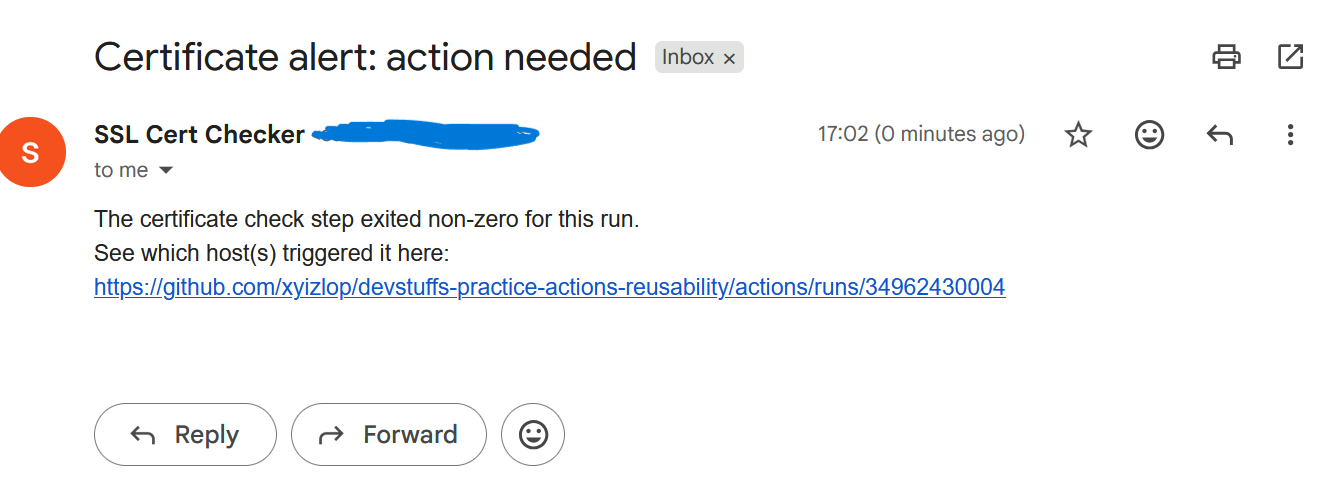
Then run it again with a sane warning window (like the default 30) against the same domain, and confirm the email step gets skipped entirely when the check passes. That’s if: failure() doing its job.
What’s Next
With monitoring, inputs, and now secrets all flowing through a reusable workflow, the next chapter formalizes the check itself — not the workflow around it, but the checkout-setup-run sequence — into a proper local composite action.