Reusable Workflows
Every workflow you’ve written so far has lived in exactly one file. That’s about to become a problem. You need the exact same certificate-checking logic to run two different ways: automatically every night against a fixed list of production domains, and on demand against a single domain someone wants to check before it goes anywhere near that list.
Copy-pasting the same three steps into two workflow files would work, right up until you needed to change something about how the check runs — then you’d be editing it twice and hoping you didn’t miss one. This is what reusable workflows solve.
Composite Steps vs. Reusable Workflows
You already know how to deduplicate steps — Section D covered composite actions that bundle several steps into one. It’s worth being precise about what that pattern does and doesn’t cover, because reusable workflows look similar but solve a different problem:
| Scope | Composite steps | Reusable workflows |
|---|---|---|
| What it dedupes | A handful of steps | An entire job |
| Where it lives | Called from inside one job | Called as its own job, from another workflow file |
| Triggers | Same trigger as the calling job | Each caller can have a completely different trigger |
| Typical use here | Reusing a checkout+setup sequence within one workflow | Sharing the whole monitoring job between a cron schedule and a manual dispatch |
A composite action answers “I don’t want to retype these five steps.” A reusable workflow answers “I have an entire job — with its own runner, its own steps, its own logic — that needs to run from two workflow files with two different triggers.” That’s exactly the situation you’re in: the certificate check itself doesn’t change; what changes is when it runs and which domains it’s pointed at.
    flowchart LR
    A[Scheduled workflow<br/>cron trigger] -->|calls| C[Reusable workflow<br/>check-certs.yml]
    B[Dispatch workflow<br/>workflow_dispatch trigger] -->|calls| C
    C --> D[checkout]
    D --> E[setup Python]
    E --> F[run ssl_cert_checker.py]
One job definition, two callers, two triggers.
Writing the Reusable Workflow
A reusable workflow is a normal workflow file with one difference: instead of (or in addition to) push or schedule, it declares workflow_call as a trigger, along with the inputs it expects from whoever calls it.
Create .github/workflows/check-certs.yml:
name: Check Certificates

on:
  workflow_call:
    inputs:
      domains:
        description: 'Hostnames to check, one per line'
        required: true
        type: string
      warning-days:
        description: 'Warn when a certificate expires within this many days'
        required: false
        type: number
        default: 30

jobs:
  check:
    runs-on: ubuntu-latest
    steps:
      - name: Checkout
        uses: actions/checkout@v7

      - name: Setup Python
        uses: actions/setup-python@v7
        with:
          python-version: "3.13"

      - name: Check certificates
        run: |
          echo "${{ inputs.domains }}" | python3 ssl_cert_checker.py --stdin --days ${{ inputs.warning-days }}
A few things worth noticing:
domainshas no default andrequired: true— every caller must decide what to check.warning-daysaccepts anumbertype as an input and has a sensible default, so a caller can leave it out entirely if30days is fine.domainsis a single multi-line string, not a YAML list.workflow_callinputs can only bestring,number, orboolean— there’s no list type. Newline-separated text piped into--stdinis the simplest way around that, and you already knowssl_cert_checker.pysupports it from the previous chapter.
This file does nothing on its own. workflow_call means it only runs when another workflow calls it — pushing this file by itself won’t trigger anything, and that’s expected.
Caller One: The Scheduled Production Check
This is the workflow that actually matters day to day: check the real domains, every night (mid-night at 00:00 UTC), without anyone touching anything.
Create .github/workflows/scheduled-cert-check.yml:
name: Nightly Certificate Check

on:
  schedule:
    - cron: '0 0 * * *'

jobs:
  check-production-domains:
    uses: ./.github/workflows/check-certs.yml
    with:
      domains: |
        example.com
        api.example.com
        cdn.example.com
      warning-days: "21"
uses: ./.github/workflows/check-certs.yml is the call itself — a path to the reusable workflow, relative to the repository root, starting with ./. The with: block supplies its inputs. Here, the production domain list lives directly in this caller, as a YAML block scalar (|) that becomes exactly the multi-line string the reusable workflow expects on --stdin.
Note
Cron-scheduled workflows only run on the repository’s default branch, and GitHub doesn’t guarantee the exact minute — under load, a scheduled run can be delayed by several minutes. Neither of those matters for a nightly certificate check, but they’re worth knowing before you rely on schedule for anything time-sensitive.
Caller Two: The On-Demand Single-Domain Check
Before a domain earns a place in that production list above, someone should be able to check it once, by hand, without editing a workflow file.
Create .github/workflows/check-one-domain.yml:
name: Check a Single Domain

on:
  workflow_dispatch:
    inputs:
      domain:
        description: 'Hostname to check'
        required: true
        type: string
      warning-days:
        description: 'Warning window, in days'
        required: false
        type: string
        default: "30"

jobs:
  check-domain:
    uses: ./.github/workflows/check-certs.yml
    with:
      domains: ${{ inputs.domain }}
      warning-days: ${{ inputs.warning-days }}
Trigger it from the Actions tab: pick “Check a Single Domain” from the workflow list, click “Run workflow,” type in a hostname, and it runs the exact same check-certs.yml job the nightly schedule uses — just with one domain and whatever warning window you type in, instead of the fixed production list.
Notice what didn’t need to be written twice: the checkout step, the Python setup, the actual invocation of ssl_cert_checker.py, and the whole business of interpreting --stdin. Both callers own only the part that’s genuinely different between them — a fixed list on a timer versus one ad-hoc hostname on demand — and hand everything else to the same reusable job.
Hands On: Try It
Push all three files, then trigger the manual one first, since you don’t have to wait for a cron tick to see it work:
git add .github/workflows/check-certs.yml \
        .github/workflows/check-one-domain.yml \
        .github/workflows/scheduled-cert-check.yml
git commit -m "Add Reusable Workflow, Call it as cron and manual"
git push- Go to your repo’s Actions tab.
- Select Check a Single Domain in the left sidebar.
- Click Run workflow, enter
example.com, leave the warning window at its default, and run it. - Watch it call into
check-certs.yml— you’ll see the called job appear as its own entry, nested under the caller.
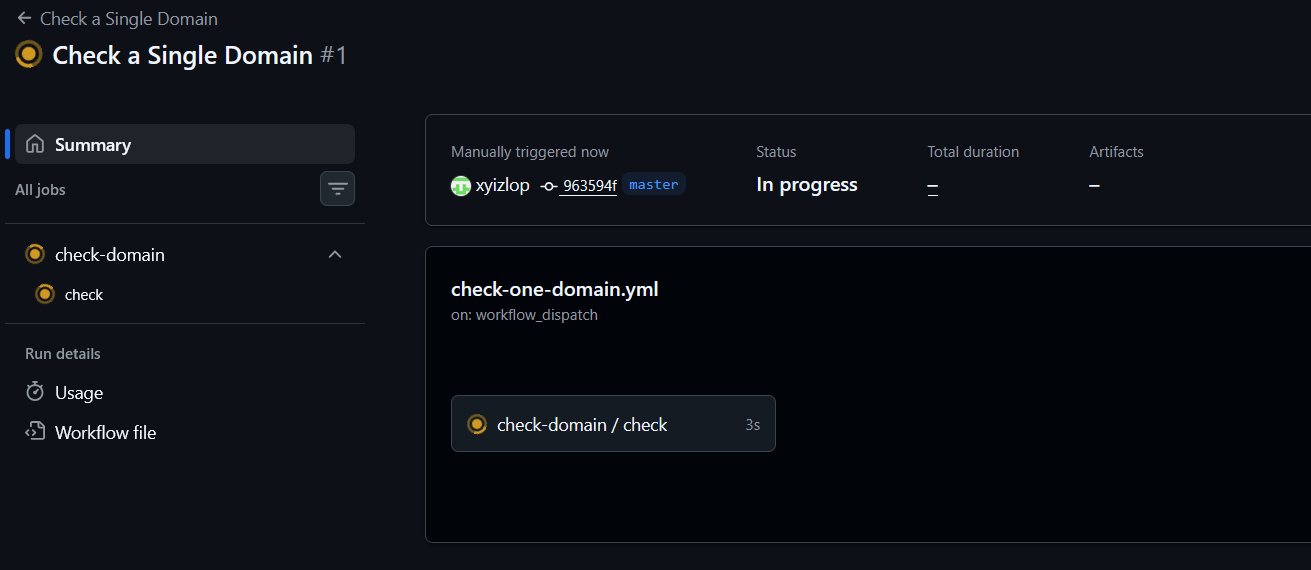
check-domain is the job we manually triggered as defined as Single Domain Check which in turn calls check job defined as Reusable Workflow.
scheduled-cert-check.yml will start running on its own 00:00 UTC (convert to your own local) without you touching anything else — it’s calling the same reusable workflow, just on a timer instead of a button.
Right now, nothing happens when a certificate turns out to be expiring. The exit code contract from the setup chapter is being computed correctly, but nobody’s watching it. That’s next — we will keep an eye.