VPC – Virtual Private Cloud
Pricing
Core Networking components like VPC creation, subnets, route tables, internet gateways, etc. are free but others like NAT Gateways, Public IP, etc. costs and may surprise you with the cost. Read about detailed cost breakdown here.
Notes
- VPC is essentially is your network boundary
- This is AWS way of managing networks for different users
Jargons
Subnets
The same networking concept of dividing your network into subsections or subnets. You can define private or public subnet.
- Private Subnet -> same as your home network, no way in from public network but can still browse internet via NAT Gateway (NGW)
- Public Subnet -> attached to Internet Gateway (IGW), apply only when your resource like web server need to be public i.e. allow public traffic from the internet
- Isolated Subnet -> neither connected to IGW nor to NGW
Subnet Security
You can defines rules on which subnet can talk to which one. For example, a rule: DB in a private subnet is not accessible from the internet but it shoule be accessible by EC2 on public subnet for fetching info, etc.
Traffic to resources in a VPC enters through IGW but before reaching the resource itself, the network packet has several walls go through. It can be network ACL associated with destination subnet the packet is being routed to or security group belonging to the resource itself.
    flowchart LR
    Internet((Internet))
    IGW["Internet Gateway"]

    RT{"Route Table<br/>Matching route?"}
    NACL{"Network ACL<br/>Allowed?"}
    SG{"Security Group<br/>Allowed?"}

    ENI["Elastic Network Interface"]
    Resource["VPC Resource"]
    App["Application"]

    DROP1["❌ Dropped<br/>No matching route"]
    DROP2["❌ Dropped<br/>NACL denies"]
    DROP3["❌ Dropped<br/>Security Group denies"]

    Internet --> IGW
    IGW --> RT

    RT -->|Route found| NACL
    RT -->|No route| DROP1

    NACL -->|Allowed| SG
    NACL -->|Denied| DROP2

    SG -->|Allowed| ENI
    SG -->|Denied| DROP3

    ENI --> Resource
    Resource --> App

    classDef internet fill:#1e3a8a,color:#ffffff,stroke:#172554,stroke-width:2px
    classDef routing fill:#fef3c7,color:#78350f,stroke:#d97706,stroke-width:2px
    classDef filtering fill:#fee2e2,color:#7f1d1d,stroke:#dc2626,stroke-width:2px
    classDef delivery fill:#dcfce7,color:#14532d,stroke:#16a34a,stroke-width:2px
    classDef dropped fill:#450a0a,color:#ffffff,stroke:#dc2626,stroke-width:2px

    class Internet,IGW internet
    class RT routing
    class NACL,SG filtering
    class ENI,Resource,App delivery
    class DROP1,DROP2,DROP3 dropped
Protip
You may need to zoom in to view this diagram properly.
Network ACL (NACL)
By default, NACL allows all inbound and outbound traffic. Hence, by default security groups are only the way to prevent unauthorized access. But you can modify the default with your own rules.
You can also create custom NACL and associate new NACL with subnet which will automatically detach the default one. And for custom NACL you start fresh with all inbound/outbound deny/deny. And with every security related concepts, rules are evaluated before allow rules.
Note
NACL is stateless i.e. it doesn’t remember previous decisions. Everytime packet enters or leaves the network the same boring list is evaluated again and again to take allow or denly decision.
Important
If you associate another NACL on any particular subnet, existing NACL is automatically detached.
Security Groups
While NACLs are network level allow/deny rules, Security Groups are the same but scoped to resources. For example: NACL may allow inbound SSH but security group might deny that. And by default, a security group denies all inbound traffic and allows all outbound traffic. Unlike NACL, you can attach multiple security groups to a resource.
One thing to note is that, you can’t explicitly add deny rule in security rule. There is implicit deny for the ones which you don’t have explicit allow.
Tip
If you need to access a resource from different private subnet, you need to attach both resources the same security group.
Note
Security Group is stateful, i.e. it remembers the state of a connection and automatically allows return traffic for connections initiated from the instance, regardless of inbound security group rules.
Benefits
- Increased Security -> because you can monitor, restrict access of resources inside your VPC network
- Time Saving -> AWS sets up, manages and validates network. Yes you provide config but still saves time compared to on-prem
- Environmment Control -> even though AWS sets up resources, it sets up only the way you tell (this many subnets, this should be private, this is public, etc.)
Connecting To Resources
To allow public access to resources inside VPC, your VPC should be attached with IGW and that resources should be in public subnet (default route to IGW), see image.
To access private resources inside your VPC, you need to setup Virtual Private Gateway in your VPC and then establish VPN connection with your coporate data center router or firewall. This way only someone inside that encrypted tunnel could access the private resources. This is actually Site-to-Site VPN.
Another way to access private resources is using jump server, you basically sets one basiton host or jump server in public subnet which can access all your private resources. You can then SSH into that jump server and from there SSH into private resources – two step process. But you can do this on one step too:
ssh -J [email protected] user@private-serverEven good with SSH config:
Host private-server
    HostName 10.0.2.15
    User ubuntu
    ProxyJump [email protected]
Then simply you can:
ssh private-serverNote
While a VPN provides secure connectivity to AWS, traffic still travels over the public internet. This means performance can be affected by congestion or variability anywhere along the network path. For example, at your ISP, on transit links, or at peering points.
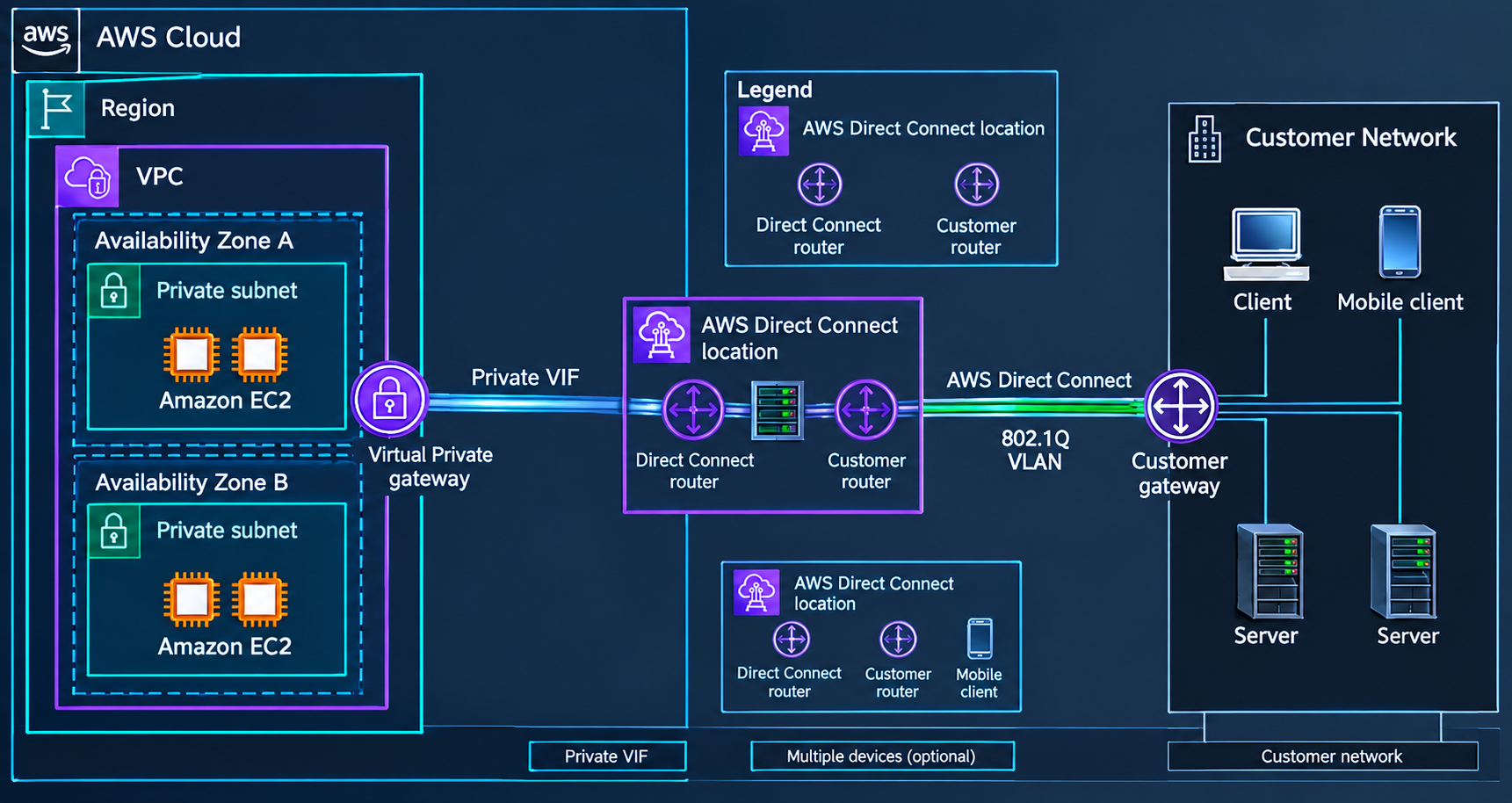
If your workload requires more predictable performance or dedicated connectivity, you can use AWS Direct Connect. It establishes a dedicated network connection between your data center and AWS, typically through a Direct Connect Partner. Availability depends on your location and provider.
More Ways To Connect
Client VPN
AWS Client VPN is used when individual users need secure access to private resources in AWS from outside the network.
For example:
Developer's Laptop
       │
       │ VPN
       ▼
AWS Client VPN
       │
       ▼
Private Subnet
       │
       ├── EC2
       ├── RDS
       └── Internal Services
    flowchart LR
    User["Remote User"]

    subgraph Internet["Internet"]
        VPN["AWS Client VPN"]
    end

    subgraph AWS["AWS"]
        VPC["VPC"]
        Private["Private Resources"]

        VPC --> Private
    end

    User -->|VPN Connection| VPN
    VPN --> VPC
Site-to-Site VPN
Use AWS Site-to-Site VPN when you need to connect an entire network (your data center or office network) to an AWS VPC, rather than giving individual users access.
On-Premises Network                 AWS
┌──────────────────┐          ┌──────────────────┐
│ Office Network   │          │       VPC        │
│                  │          │                  │
│ PCs / Servers    │◄────────►│ Private Resources│
└──────────────────┘    VPN   └──────────────────┘
AWS Site-to-Site VPN is a fully managed service that creates a secure, encrypted IPsec connection between your on-premises data center or branch office and your AWS resources.
Core Components
Customer Gateway (CGW): The physical device or software application on your side of the connection, such as your local network’s VPN device.
Virtual Private Gateway (VGW) or Transit Gateway (TGW): The AWS-side endpoint that terminates the VPN connection for a VPC or multiple routed networks.
Dual Tunnels: Each Site-to-Site VPN connection provides two independent tunnels, terminating in different Availability Zones for automatic failover and high availability.
    flowchart LR
    subgraph OnPrem["On-Premises"]
        Network["Corporate Network"]
        CGW["Customer Gateway"]
        Network --> CGW
    end


    subgraph AWS["AWS"]
        VGW["Virtual Private Gateway"]
        VPC["VPC"]
        Private["Private Resources"]

        VGW --> VPC
        VPC --> Private
    end

    CGW <-->|VPN Connection| VGW
About Dual Tunnels:
Each Site-to-Site VPN connection has two tunnels, with each tunnel using a unique public IP address. It is important to configure both tunnels for redundancy. When one tunnel becomes unavailable (for example, down for maintenance), network traffic is automatically routed to the available tunnel for that specific Site-to-Site VPN connection. Source: AWS docs.
So diagram to show two tunnels can be:
    flowchart LR
    subgraph OnPrem["On-Premises Network"]
        CGW["Customer Gateway"]
    end

    subgraph AWS["AWS"]
        subgraph AZ1["Availability Zone A"]
            EP1["VPN Endpoint\n(Router)"]
        end

        subgraph AZ2["Availability Zone B"]
            EP2["VPN Endpoint\n(Router)"]
        end

        VPC["VPC"]
        VGW["Virtual Private Gateway"]
        EP1 --> VGW
        EP2 --> VGW
        VGW --> VPC
    end

    CGW -->|"Tunnel 1"| EP1
    CGW -->|"Tunnel 2"| EP2
Distinction with Client VPN:
Client VPN → individual users → AWS
Site-to-Site VPN → entire network → AWS
AWS PrivateLink
Use AWS PrivateLink when you want to privately access a service from within a vpc without exposing traffic to the public internet, especially when the service is owned by another VPC, AWS account, or third-party provider.
AWS PrivateLink is a highly available, scalable technology that you can use to privately connect your VPC to services and resources as if they were in your VPC. You do not need to use an internet gateway, NAT device, public IP address, Direct Connect connection, or AWS Site-to-Site VPN connection to allow communication with the service or resource from your private subnets. Therefore, you control the specific API endpoints, sites, services, and resources that are reachable from your VPC. Source AWS PrivateLink docs.
    flowchart TD
    subgraph Region["AWS Region"]
        subgraph VPC["VPC"]
            App["Applications"]

            IE1["Interface\nEndpoint"]
            IE2["Interface\nEndpoint"]
            IE3["Interface\nEndpoint"]
            RE["Resource\nEndpoint"]
            SNE["Service Network\nEndpoint"]

            App --> IE1
            App --> IE2
            App --> IE3
            App --> RE
            App --> SNE
        end

        subgraph AWS["AWS Services"]
            AWSsvc["AWS Services"]
        end

        subgraph Provider["Provider VPC"]
            PL["Endpoint Service"]
            Services["Provider Services"]
            PL --> Services
        end

        subgraph ThirdParty["Third-party VPC"]
            Third["Third-party Service"]
        end

        subgraph Resource["VPC Resource"]
            Resources["VPC Resources"]
        end

        subgraph Lattice["VPC Lattice Service Network"]
            LatticeSvc["Service Network"]
        end

        IE1 --> AWSsvc
        IE2 --> PL
        IE3 --> Third
        RE --> Resources
        SNE --> LatticeSvc
    end
AWS Direct Connect
If your workload requires more predictable performance or dedicated connectivity, you can use AWS Direct Connect. It establishes a dedicated network connection between your data center and AWS, typically through a Direct Connect Partner. Availability depends on your location and provider.